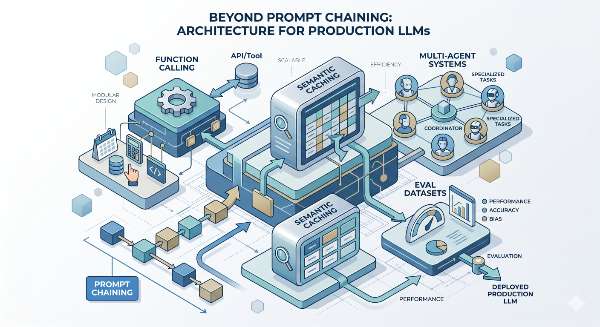
Beyond Prompt Chaining: Function Calling, Semantic Caching, Multi-Agent Systems, and Eval Datasets

D. Rout
April 28, 2026 14 min read
On this page
The previous tutorial in this series — Zero-Shot to Chain-of-Thought: A Developer's Guide to Writing Effective AI Prompts — laid the foundation for structured thinking with LLMs. The follow-up covered JSON mode, prompt chaining, RAG, and basic automated evals. This post goes further, tackling the four capabilities that separate a side-project LLM integration from a production system your team can confidently iterate on: typed function/tool calling, semantic caching to slash latency and cost, multi-agent orchestration for tasks no single prompt can handle, and persistent eval datasets that let you track prompt quality over time like any other engineering metric. Each section is self-contained — jump to whichever is most relevant today.
Prerequisites
- Node.js 18+ and TypeScript
- Familiarity with
async/await, Express, and basic LLM API usage (see the prior posts in this series) - API keys for Anthropic and/or OpenAI (
ANTHROPIC_API_KEY,OPENAI_API_KEY) - Redis for semantic caching —
docker run -p 6379:6379 redisis enough locally - A vector store (Pinecone or pgvector) for caching embeddings and eval storage
- MongoDB or PostgreSQL for persistent eval datasets
1. Function Calling — Typed Tool Use with Schema Enforcement
Function calling (also called tool use) is the production-grade alternative to JSON mode. Instead of prompting the model to "return JSON that looks like X", you declare a typed schema upfront and the model is architecturally constrained to call your function with matching arguments. No regex, no fragile parsing, no hallucinated keys.
The real power is bidirectional: the model doesn't just return structured data — it can decide which tool to invoke, with which arguments, based on the user's intent. This is how you build agents that can actually do things.
1a. OpenAI function calling
// lib/tools/openaiTools.ts
import OpenAI from "openai";

const openai = new OpenAI({ apiKey: process.env.OPENAI_API_KEY });

const tools: OpenAI.Chat.Completions.ChatCompletionTool[] = [
  {
    type: "function",
    function: {
      name: "search_products",
      description: "Search the product catalogue by keyword and optional filters",
      parameters: {
        type: "object",
        properties: {
          query: { type: "string", description: "Search keyword or phrase" },
          category: {
            type: "string",
            enum: ["electronics", "clothing", "books", "home"],
          },
          max_price: { type: "number", description: "Maximum price in USD" },
        },
        required: ["query"],
      },
    },
  },
  {
    type: "function",
    function: {
      name: "get_order_status",
      description: "Look up the status of an order by order ID",
      parameters: {
        type: "object",
        properties: {
          order_id: { type: "string", description: "e.g. ORD-12345" },
        },
        required: ["order_id"],
      },
    },
  },
];

async function dispatchTool(name: string, args: Record<string, unknown>) {
  switch (name) {
    case "search_products":
      return [{ id: "P001", name: `${args.query} — Premium`, price: 49.99 }];
    case "get_order_status":
      return { order_id: args.order_id, status: "shipped", eta: "2 days" };
    default:
      throw new Error(`Unknown tool: ${name}`);
  }
}

export async function runToolLoop(userMessage: string): Promise<string> {
  const messages: OpenAI.Chat.Completions.ChatCompletionMessageParam[] = [
    { role: "user", content: userMessage },
  ];

  while (true) {
    const response = await openai.chat.completions.create({
      model: "gpt-4o",
      tools,
      tool_choice: "auto",
      messages,
    });

    const choice = response.choices[0];

    if (choice.finish_reason === "stop") {
      return choice.message.content ?? "";
    }

    if (choice.finish_reason === "tool_calls") {
      messages.push(choice.message);
      for (const toolCall of choice.message.tool_calls ?? []) {
        const args = JSON.parse(toolCall.function.arguments);
        const result = await dispatchTool(toolCall.function.name, args);
        messages.push({
          role: "tool",
          tool_call_id: toolCall.id,
          content: JSON.stringify(result),
        });
      }
    }
  }
}
1b. Anthropic tool use
Claude uses tools + tool_use content blocks with the same agentic loop pattern:
// lib/tools/claudeTools.ts
import Anthropic from "@anthropic-ai/sdk";

const client = new Anthropic({ apiKey: process.env.ANTHROPIC_API_KEY });

const tools: Anthropic.Tool[] = [
  {
    name: "search_products",
    description: "Search the product catalogue by keyword and optional filters",
    input_schema: {
      type: "object" as const,
      properties: {
        query: { type: "string" },
        category: { type: "string", enum: ["electronics", "clothing", "books", "home"] },
        max_price: { type: "number" },
      },
      required: ["query"],
    },
  },
];

export async function runClaudeToolLoop(userMessage: string): Promise<string> {
  const messages: Anthropic.MessageParam[] = [{ role: "user", content: userMessage }];

  while (true) {
    const response = await client.messages.create({
      model: "claude-opus-4-5",
      max_tokens: 1024,
      tools,
      messages,
    });

    if (response.stop_reason === "end_turn") {
      const text = response.content.find((b) => b.type === "text");
      return text?.type === "text" ? text.text : "";
    }

    if (response.stop_reason === "tool_use") {
      messages.push({ role: "assistant", content: response.content });
      const toolResults: Anthropic.ToolResultBlockParam[] = [];
      for (const block of response.content) {
        if (block.type !== "tool_use") continue;
        const result = [{ id: "P001", name: `${(block.input as any).query} result`, price: 29.99 }];
        toolResults.push({ type: "tool_result", tool_use_id: block.id, content: JSON.stringify(result) });
      }
      messages.push({ role: "user", content: toolResults });
    }
  }
}
1c. Type-safe tool schemas with Zod
// lib/tools/schemas.ts
import { z } from "zod";

export const SearchProductsSchema = z.object({
  query: z.string().min(1),
  category: z.enum(["electronics", "clothing", "books", "home"]).optional(),
  max_price: z.number().positive().optional(),
});

export const GetOrderStatusSchema = z.object({
  order_id: z.string().regex(/^ORD-\d+$/),
});

export function validateToolArgs<T>(schema: z.ZodSchema<T>, args: unknown): T {
  const result = schema.safeParse(args);
  if (!result.success) throw new Error(`Invalid tool args: ${JSON.stringify(result.error.flatten())}`);
  return result.data;
}
2. Semantic Caching — Cut Latency and Cost on Repeated Queries
LLM calls are slow (500ms–3s) and expensive. Semantic caching stores embeddings of previous queries alongside their responses. When a new query arrives, you check cosine similarity against the cache — if it clears your threshold, return the cached answer without touching the model.
This is fundamentally different from key-value caching: "What's your return policy?" and "How do I return an item?" are different strings but semantically identical. Semantic caching handles both.
2a. Cache layer
// lib/cache/semanticCache.ts
import { createClient } from "redis";
import OpenAI from "openai";
import { Pinecone } from "@pinecone-database/pinecone";

const redis = createClient({ url: process.env.REDIS_URL ?? "redis://localhost:6379" });
const openai = new OpenAI({ apiKey: process.env.OPENAI_API_KEY });
const pinecone = new Pinecone({ apiKey: process.env.PINECONE_API_KEY! });
await redis.connect();

const SIMILARITY_THRESHOLD = 0.92;
const CACHE_TTL_SECONDS = 60 * 60 * 24;

async function embedQuery(text: string): Promise<number[]> {
  const res = await openai.embeddings.create({ model: "text-embedding-3-small", input: text });
  return res.data[0].embedding;
}

export async function getCachedResponse(query: string): Promise<string | null> {
  const vector = await embedQuery(query);
  const results = await pinecone.index("semantic-cache").query({ vector, topK: 1, includeMetadata: true });
  const top = results.matches[0];
  if (!top?.score || top.score < SIMILARITY_THRESHOLD) return null;
  return redis.get(`cache:${top.id}`);
}

export async function setCachedResponse(query: string, response: string, queryId: string) {
  const vector = await embedQuery(query);
  await pinecone.index("semantic-cache").upsert([
    { id: queryId, values: vector, metadata: { query, createdAt: new Date().toISOString() } },
  ]);
  await redis.setEx(`cache:${queryId}`, CACHE_TTL_SECONDS, response);
}
2b. Cache-aware query handler
// lib/cache/cachedLlmQuery.ts
import { getCachedResponse, setCachedResponse } from "./semanticCache";
import { ragAnswer } from "../rag/ragQuery";
import { randomUUID } from "crypto";

export async function cachedQuery(userQuery: string) {
  const start = Date.now();
  const cached = await getCachedResponse(userQuery);
  if (cached) return { answer: cached, source: "cache" as const, latencyMs: Date.now() - start };

  const answer = await ragAnswer(userQuery);
  // Write to cache async — don't block the response
  setCachedResponse(userQuery, answer, randomUUID()).catch(console.error);
  return { answer, source: "llm" as const, latencyMs: Date.now() - start };
}
2c. Cache invalidation
// lib/cache/cacheInvalidation.ts
import { Pinecone } from "@pinecone-database/pinecone";
import { createClient } from "redis";

const pinecone = new Pinecone({ apiKey: process.env.PINECONE_API_KEY! });
const redis = createClient({ url: process.env.REDIS_URL });

export async function invalidateCacheByTag(tag: string) {
  const index = pinecone.index("semantic-cache");
  const results = await index.query({
    vector: new Array(1536).fill(0),
    topK: 100,
    filter: { tag: { $eq: tag } },
    includeMetadata: true,
  });
  const ids = results.matches.map((m) => m.id);
  if (!ids.length) return;
  await index.deleteMany(ids);
  await Promise.all(ids.map((id) => redis.del(`cache:${id}`)));
}
3. Multi-Agent Orchestration
A single LLM call is a function. An agent is an LLM in a loop with tools. A multi-agent system is specialised agents collaborating — each focused on a narrow sub-task, coordinated by an orchestrator. Use this when a task is too complex for one context window, benefits from parallel sub-tasks, or needs specialist "personas" (researcher, writer, fact-checker).
3a. Agent base class
// lib/agents/baseAgent.ts
import Anthropic from "@anthropic-ai/sdk";

const client = new Anthropic({ apiKey: process.env.ANTHROPIC_API_KEY });

export interface AgentConfig {
  name: string;
  role: string;
  tools?: Anthropic.Tool[];
  maxTokens?: number;
}

export class Agent {
  private config: AgentConfig;
  private history: { role: "user" | "assistant"; content: string }[] = [];

  constructor(config: AgentConfig) { this.config = config; }

  async run(input: string): Promise<string> {
    this.history.push({ role: "user", content: input });
    const response = await client.messages.create({
      model: "claude-opus-4-5",
      max_tokens: this.config.maxTokens ?? 1024,
      system: this.config.role,
      tools: this.config.tools ?? [],
      messages: this.history,
    });
    const output = (response.content.find((b) => b.type === "text") as Anthropic.TextBlock)?.text ?? "";
    this.history.push({ role: "assistant", content: output });
    return output;
  }

  clearHistory() { this.history = []; }
}
3b. Specialist agents
// lib/agents/specialists.ts
import { Agent } from "./baseAgent";

export const researchAgent = new Agent({
  name: "Researcher",
  role: "Identify key sub-questions, list relevant facts and data points, and return a structured research brief — not a final answer. Flag what you don't know.",
  maxTokens: 2048,
});

export const writerAgent = new Agent({
  name: "Writer",
  role: "Given a research brief, write a clear, well-structured response for a developer audience. Use concrete examples and code blocks where relevant. Optimise for clarity, not length.",
  maxTokens: 2048,
});

export const factCheckerAgent = new Agent({
  name: "FactChecker",
  role: "Identify inaccurate, outdated, or unverified claims in the draft. Flag logical inconsistencies. Return a list of issues found, or 'NO_ISSUES' if the draft passes.",
  maxTokens: 512,
});
3c. Sequential orchestrator
// lib/agents/orchestrator.ts
import { researchAgent, writerAgent, factCheckerAgent } from "./specialists";

export async function orchestrate(userQuery: string) {
  const researchBrief = await researchAgent.run(userQuery);
  const draft = await writerAgent.run(`Research brief:\n\n${researchBrief}\n\nQuestion: ${userQuery}`);
  const factCheck = await factCheckerAgent.run(`Question: ${userQuery}\n\nDraft:\n${draft}`);

  let finalAnswer = draft;
  if (!factCheck.trim().startsWith("NO_ISSUES")) {
    finalAnswer = await writerAgent.run(
      `Fact-checker flagged:\n\n${factCheck}\n\nRevise the draft to address these issues.`
    );
  }

  [researchAgent, writerAgent, factCheckerAgent].forEach((a) => a.clearHistory());
  return { answer: finalAnswer, researchBrief, factCheck, revised: finalAnswer !== draft };
}
3d. Parallel agent execution
// lib/agents/parallelOrchestrator.ts
import { Agent } from "./baseAgent";

const sentimentAgent = new Agent({ name: "Sentiment", role: "Return POSITIVE, NEGATIVE, or NEUTRAL." });
const categoryAgent = new Agent({ name: "Category", role: "Return: BUG_REPORT, FEATURE_REQUEST, BILLING, or GENERAL." });
const urgencyAgent = new Agent({ name: "Urgency", role: "Return a single number 1–5 for urgency." });

export async function triageFeedback(feedback: string) {
  const [sentiment, category, urgency] = await Promise.all([
    sentimentAgent.run(feedback),
    categoryAgent.run(feedback),
    urgencyAgent.run(feedback),
  ]);
  return { sentiment: sentiment.trim(), category: category.trim(), urgency: parseInt(urgency.trim(), 10) };
}
4. Persistent Eval Datasets — Tracking Prompt Quality Over Time
One-off eval scripts tell you whether your prompt passes today. Persistent eval datasets tell you when it broke and how much quality changed across model updates and prompt rewrites. This is the discipline that makes LLM features maintainable at scale.
4a. Schema (MongoDB)
// lib/evals/schema.ts
import mongoose from "mongoose";

const EvalCaseSchema = new mongoose.Schema({
  id: { type: String, required: true, unique: true },
  input: { type: String, required: true },
  expectedOutput: String,
  gradingCriteria: String,
  evaluatorType: { type: String, enum: ["exact", "contains", "schema", "llm-judge"], required: true },
  tags: [String],
}, { collection: "eval_cases" });

const EvalRunSchema = new mongoose.Schema({
  runId: { type: String, required: true },
  triggeredBy: String,
  modelId: { type: String, required: true },
  promptVersion: String,
  results: [{ caseId: String, passed: Boolean, actualOutput: String, score: Number, reason: String, latencyMs: Number }],
  summary: { total: Number, passed: Number, failed: Number, passRate: Number },
  createdAt: { type: Date, default: Date.now },
}, { collection: "eval_runs" });

export const EvalCase = mongoose.model("EvalCase", EvalCaseSchema);
export const EvalRun = mongoose.model("EvalRun", EvalRunSchema);
4b. Seed your dataset
// scripts/seedEvals.ts
import mongoose from "mongoose";
import { EvalCase } from "../lib/evals/schema";

await mongoose.connect(process.env.MONGODB_URI!);

await EvalCase.insertMany([
  {
    id: "sentiment-positive-001",
    input: "This product exceeded every expectation. Absolutely brilliant.",
    expectedOutput: "positive",
    evaluatorType: "contains",
    tags: ["sentiment", "critical"],
  },
  {
    id: "rag-refund-001",
    input: "What is your refund policy?",
    gradingCriteria: "Must mention a timeframe. Score 8+ if grounded, below 4 if hallucinated.",
    evaluatorType: "llm-judge",
    tags: ["rag", "policy"],
  },
  // Add more cases per feature area...
], { ordered: false }).catch(() => console.log("Skipping duplicates"));

await mongoose.disconnect();
4c. Persistent eval runner
// lib/evals/persistentRunner.ts
import mongoose from "mongoose";
import { randomUUID } from "crypto";
import { EvalCase, EvalRun } from "./schema";
import { llmJudge } from "./llmJudge";
import { analyzeReview } from "../llm/openaiJson";
import { ragAnswer } from "../rag/ragQuery";
import { runToolLoop } from "../tools/openaiTools";

async function executeCase(input: string, tags: string[]): Promise<string> {
  if (tags.includes("sentiment")) return (await analyzeReview(input)).sentiment;
  if (tags.includes("rag")) return ragAnswer(input);
  if (tags.includes("tool-use")) return runToolLoop(input);
  throw new Error("No executor for tags: " + tags.join(", "));
}

export async function runPersistentEvals(options: { triggeredBy?: string; modelId?: string; tags?: string[] }) {
  const { triggeredBy = "manual", modelId = "claude-opus-4-5", tags } = options;
  const runId = randomUUID();
  const cases = await EvalCase.find(tags ? { tags: { $in: tags } } : {}).lean();
  const results = [];

  for (const ec of cases) {
    const start = Date.now();
    try {
      const actualOutput = await executeCase(ec.input, ec.tags ?? []);
      let passed = false, score: number | undefined, reason: string | undefined;

      if (ec.evaluatorType === "exact") passed = actualOutput.trim().toLowerCase() === ec.expectedOutput?.trim().toLowerCase();
      else if (ec.evaluatorType === "contains") passed = actualOutput.toLowerCase().includes(ec.expectedOutput?.toLowerCase() ?? "");
      else if (ec.evaluatorType === "llm-judge" && ec.gradingCriteria) {
        const j = await llmJudge(ec.input, actualOutput, ec.gradingCriteria);
        ({ score, reason } = j); passed = j.score >= 7;
      }

      results.push({ caseId: ec.id, passed, actualOutput, score, reason, latencyMs: Date.now() - start });
    } catch (err) {
      results.push({ caseId: ec.id, passed: false, actualOutput: `ERROR: ${err}`, latencyMs: Date.now() - start });
    }
  }

  const passed = results.filter((r) => r.passed).length;
  const summary = { total: results.length, passed, failed: results.length - passed, passRate: Math.round((passed / results.length) * 100) };
  await EvalRun.create({ runId, triggeredBy, modelId, results, summary });
  return { runId, summary, results };
}
Add this to CI:
# .github/workflows/llm-evals.yml
name: LLM Eval Suite
on: [pull_request]
jobs:
  evals:
    runs-on: ubuntu-latest
    steps:
      - uses: actions/checkout@v4
      - uses: actions/setup-node@v4
        with: { node-version: "20" }
      - run: npm ci
      - run: npx ts-node evals/suite.ts
        env:
          ANTHROPIC_API_KEY: ${{ secrets.ANTHROPIC_API_KEY }}
          OPENAI_API_KEY: ${{ secrets.OPENAI_API_KEY }}
Reference: Production LLM Capability Comparison
| Capability | When to Use | Latency Impact | Cost Impact | Key Gotcha |
|---|---|---|---|---|
| Function Calling | Structured extraction, tool dispatch | Minimal | Minimal | Validate args with Zod before executing |
| JSON Mode | Simple structured output, no dispatch | Minimal | Minimal | Requires "json" in system prompt |
| Semantic Caching | High query repetition, latency-sensitive | −80% on hits | −80% on hits | Threshold too low = stale answers |
| Sequential Agents | Multi-step reasoning, review/revise loops | N × LLM latency | N × tokens | Error propagation between steps |
| Parallel Agents | Independent sub-tasks, triage | Max single call | N × tokens | Agents must not share mutable state |
| Persistent Eval Dataset | Regression tracking across versions | N/A (offline) | Per CI run | Executor map must stay in sync |
| LLM-as-Judge | Nuanced grading (tone, factuality) | +1 LLM call | +tokens/eval | Freeze judge prompt version in config |
What's Next
- Streaming with tool calls — Anthropic and OpenAI both support streaming in tool-use mode. Adding it to agentic loops dramatically improves perceived responsiveness for long-running pipelines.
- Agent memory and state — Production agents need memory beyond one context window. Explore summarisation-based memory, entity extraction, and Redis/MongoDB state stores for persistence across sessions.
- Cost and token budgeting — As multi-agent systems scale, token spend becomes a first-class concern. Build middleware to track usage per pipeline, set hard limits, and fall back to cheaper models for classification-only steps.
- Eval-driven prompt optimisation — Use your persistent eval dataset to A/B test prompt rewrites, measure pass rate deltas, and only promote changes that improve evals. Prompt engineering becomes a measurable practice, not intuition.
Further Reading
- OpenAI Function Calling Guide — Covers parallel tool calls, strict mode, and the full tool-use message lifecycle.
- Anthropic Tool Use Documentation — Claude-specific patterns including multi-turn loops and best practices for tool descriptions.
- Redis: What Is Semantic Caching? — Architecture primer with implementation strategies and threshold tuning guidance.
- LangGraph — Multi-Agent Orchestration — The leading framework for stateful, graph-based multi-agent systems in JS/Python.
- Your AI Product Needs Evals — Hamel Husain — The definitive practical essay on building LLM eval pipelines with real-world examples.
- Anthropic: Evaluating AI Systems — Research-level thinking on eval design, rubric construction, and the limits of automated evaluation.
Read next
Comments (0)
Join the conversation
Sign in to leave a comment on this post.
No comments yet. to be the first!