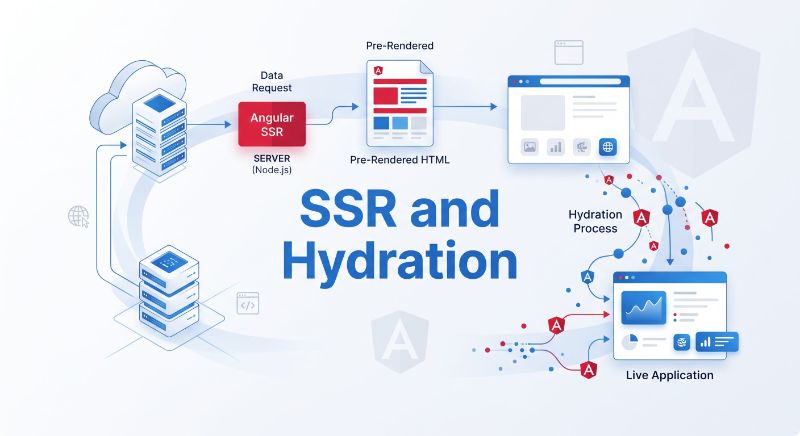
Build a Hybrid-Rendered Angular App: SSR, SSG & Hydration

D. Rout
August 19, 2026 7 min read
On this page
What we're building
In Part 1 we covered why SSR exists and the three render modes Angular gives you. Now we build the real thing: a small shop app with a CSR homepage, a prerendered About page, an SSR product list and detail page, and a comments block that hydrates incrementally only when it scrolls into view. Full source is in this repo: angular-ssr-hybrid-rendering-demo. Clone it and follow along, or read the code inline below and type it out yourself.
Prerequisites
- Node.js 20.11+ and npm 10+
- Angular CLI 21 (`npm i -g @angular/cli`), or use `npx`
- Read Part 1 first if you haven't, this post assumes you know
RenderMode.Server/Client/Prerenderand what hydration does - Basic familiarity with Express is helpful but not required
1. Scaffold the project
npx @angular/cli@latest new angular-ssr-hybrid-rendering-demo --ssr
cd angular-ssr-hybrid-rendering-demo
The --ssr flag generates src/main.server.ts, src/server.ts, src/app/app.config.server.ts, and adds @angular/ssr and @angular/platform-server to package.json. Confirm it runs before changing anything:
npm run build
npm run serve:ssr
# http://localhost:4000
2. Define per-route rendering strategy
Everything about hybrid rendering lives in one file. Here we mix all three modes across four routes:
// src/app/app.routes.server.ts
import { RenderMode, ServerRoute } from '@angular/ssr';

export const serverRoutes: ServerRoute[] = [
  { path: '', renderMode: RenderMode.Client },        // homepage: CSR
  { path: 'about', renderMode: RenderMode.Prerender }, // static: SSG
  { path: 'products', renderMode: RenderMode.Server }, // list: SSR
  { path: 'products/:id', renderMode: RenderMode.Server }, // detail: SSR
  { path: '**', renderMode: RenderMode.Server },
];
And the matching client-side routes, lazy-loaded as standalone components:
// src/app/app.routes.ts
import { Routes } from '@angular/router';

export const routes: Routes = [
  { path: '', loadComponent: () => import('./pages/home/home').then(m => m.Home) },
  { path: 'about', loadComponent: () => import('./pages/about/about').then(m => m.About) },
  { path: 'products', loadComponent: () => import('./pages/products/products').then(m => m.Products) },
  { path: 'products/:id', loadComponent: () => import('./pages/product-detail/product-detail').then(m => m.ProductDetail) },
];
3. Wire up server rendering and hydration
// src/app/app.config.server.ts
import { mergeApplicationConfig, ApplicationConfig } from '@angular/core';
import { provideServerRendering, withRoutes } from '@angular/ssr';
import { appConfig } from './app.config';
import { serverRoutes } from './app.routes.server';

const serverConfig: ApplicationConfig = {
  providers: [
    provideServerRendering(
      { maxResponseBodySize: 2 * 1024 * 1024 }, // cap buffered SSR fetch responses at 2MB
      withRoutes(serverRoutes),
    ),
  ],
};

export const config = mergeApplicationConfig(appConfig, serverConfig);
// src/app/app.config.ts
import { ApplicationConfig, provideZonelessChangeDetection } from '@angular/core';
import { provideRouter } from '@angular/router';
import { provideClientHydration, withEventReplay } from '@angular/platform-browser';
import { provideHttpClient, withFetch } from '@angular/common/http';
import { routes } from './app.routes';

export const appConfig: ApplicationConfig = {
  providers: [
    provideZonelessChangeDetection(),
    provideRouter(routes),
    provideClientHydration(withEventReplay()),
    provideHttpClient(withFetch()), // withFetch() is required for SSR-safe HTTP calls
  ],
};
withFetch() matters here: the fetch-based backend is what lets HttpClient work correctly inside the server render pass, and it plays well with Angular's HTTP transfer cache, so data fetched during SSR is embedded in the page and not re-fetched on hydration.
4. Build the SSR product routes with a shared service
// src/app/services/product.service.ts
import { Injectable, inject } from '@angular/core';
import { HttpClient } from '@angular/common/http';

export interface Product { id: string; name: string; price: number; description: string; }

@Injectable({ providedIn: 'root' })
export class ProductService {
  private http = inject(HttpClient);

  getProducts() {
    return this.http.get<Product[]>('/api/products'); // relative URL, resolved server-side too
  }
}
// src/app/pages/products/products.ts
import { Component, inject, signal } from '@angular/core';
import { RouterLink } from '@angular/router';
import { ProductService, Product } from '../../services/product.service';

@Component({
  selector: 'app-products',
  standalone: true,
  imports: [RouterLink],
  templateUrl: './products.html',
})
export class Products {
  private productService = inject(ProductService);
  products = signal<Product[]>([]);

  constructor() {
    this.productService.getProducts().subscribe(p => this.products.set(p));
  }
}
<!-- src/app/pages/products/products.html -->
@for (product of products(); track product.id) {
  <div class="card">
    <h3><a [routerLink]="['/products', product.id]">{{ product.name }}</a></h3>
    <p>${{ product.price }}</p>
  </div>
} @empty {
  <div class="skeleton"></div>
}
Because this route is RenderMode.Server, that HTTP call runs on the server for every request and the resulting HTML already has product cards in it when it reaches the browser.
5. Add incremental hydration to a comments block
The product detail page fetches one product, then defers hydration of a comments component until it's actually visible:
<!-- src/app/pages/product-detail/product-detail.html -->
@if (product(); as p) {
  <h1>{{ p.name }}</h1>
  <p>{{ p.description }}</p>

  @defer (on viewport; hydrate on viewport) {
    <app-comments [productId]="p.id" />
  } @placeholder {
    <div class="skeleton" aria-label="Comments loading"></div>
  }
}
The comments block is still rendered as real HTML on the server (good for SEO, no layout shift), but its JavaScript, event listeners, and change detection don't activate until the user scrolls near it. Confirm it in DevTools: open the Network tab, filter to JS, and watch the comments chunk stay unrequested until you scroll.
6. Build a server that serves both the app and an API
// src/server.ts (trimmed, see repo for full version)
import { AngularAppEngine, createRequestHandler } from '@angular/ssr';
import express from 'express';

const app = express();
const angularApp = new AngularAppEngine();

app.get('/api/products', (_req, res) => {
  res.json([
    { id: '1', name: 'Mechanical Keyboard', price: 129, description: 'Hot-swappable switches.' },
    { id: '2', name: 'Ultrawide Monitor', price: 749, description: '34" curved, 144Hz.' },
  ]);
});

app.use('/**', (req, res, next) => {
  angularApp.handle(req).then(response =>
    response ? writeResponseToNodeResponse(response, res) : next(),
  ).catch(next);
});

app.listen(process.env['PORT'] || 4000);
export const reqHandler = createRequestHandler(app);
This is the pattern worth internalizing: your SSR server is just a normal Express (or Fastify, or Hono) app with one extra catch-all route that hands unmatched requests to AngularAppEngine. You can add auth middleware, rate limiting, and other API routes exactly as you would in any Node backend.
7. Run it end to end
npm run build
npm run serve:ssr
Then check each route's behavior:
view-source:http://localhost:4000/productsshould show fully populated<div class="card">markupview-source:http://localhost:4000/aboutshould show static HTML with no client fetch involvedhttp://localhost:4000/should flash a shell briefly, then fill in client-side
Reference: common SSR errors and fixes
| Symptom | Likely cause | Fix |
|---|---|---|
NG0200: Circular dependency only on server build |
A service reaches for window/document at construction time |
Guard with isPlatformBrowser(inject(PLATFORM_ID)) or move the access into afterNextRender() |
| Console warning: hydration node mismatch | Direct DOM manipulation (e.g. a third-party widget using innerHTML) bypassing Angular's rendering |
Wrap the widget in ngSkipHydration or refactor to Angular bindings |
Application remains unstable after 10s |
A pending interval, timeout, or unresolved promise blocking stability | Use provideStabilityDebugging() in dev to trace it; move non-essential timers outside the stability check |
| Duplicate HTTP calls after hydration | HttpClient transfer cache not active |
Ensure provideHttpClient(withFetch()) is present in both client and server configs |
RenderMode.Prerender route 404s on dynamic params |
Missing getPrerenderParams() for a parameterized static route |
Either switch the route to RenderMode.Server, or supply getPrerenderParams to enumerate build-time params |
maxResponseBodySize exceeded |
A server-side fetch pulled in a large payload | Raise the limit deliberately in provideServerRendering(), or move the large fetch to client-side only |
What's next
- Add
getPrerenderParams()to prerender your top N products at build time and fall back to SSR for the rest - Add response caching headers (
Cache-Control,stale-while-revalidate) on the SSR routes that don't change every second - Deploy to a platform with edge SSR support and compare cold-start latency against a traditional Node server
- Add Angular DevTools' hydration stats panel to your CI smoke tests to catch mismatches before they ship
Further reading
- Angular SSR guide (angular.dev)
- Incremental hydration guide (angular.dev)
- withRoutes API reference (angular.dev)
- provideServerRendering API reference (angular.dev)
- HttpClient transfer cache guide (angular.dev)
- Core Web Vitals (web.dev)
Closing
That's a complete, runnable hybrid-rendered Angular app: a CSR homepage, a prerendered About page, SSR product routes, and a comments block that hydrates only when needed. Clone the full project, including the Express server and all component code, from angular-ssr-hybrid-rendering-demo, and adapt the render-mode decisions in app.routes.server.ts to your own app's routes.
Read next
Comments (0)
Join the conversation
Sign in to leave a comment on this post.
No comments yet. to be the first!