Multi-Tenant MongoDB Schema Design: Shared Collections vs DB-per-Tenant

D. Rout
September 22, 2026 13 min read
On this page
If you're building a SaaS product on MongoDB, the schema decision you make in week one is the one you'll spend a very unpleasant week two years from now trying to undo. Multi-tenant schema design isn't really a MongoDB-specific problem — it's the same shared-database-vs-isolated-database question every SaaS backend faces — but MongoDB's flexible document model makes it deceptively easy to punt on the decision, ship something that "works," and only discover the actual constraints when a customer signs a contract that requires physical data isolation, or when your free-tier Atlas cluster refuses to create tenant number 101.
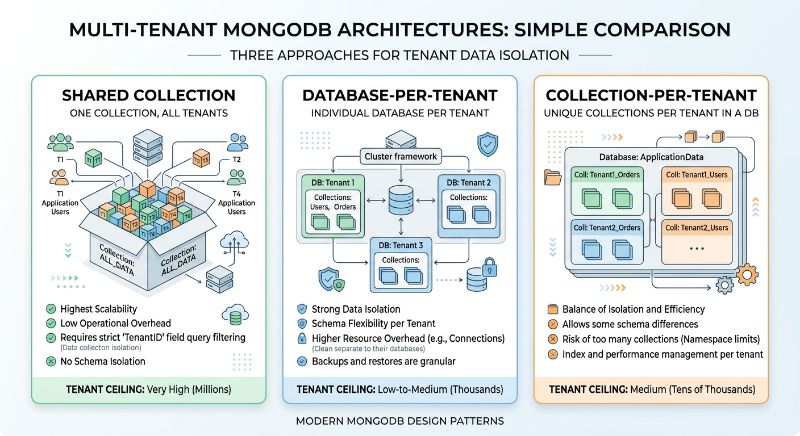
This post walks through the three patterns you'll actually choose between — shared collection with a tenant field, database-per-tenant, and collection-per-tenant — with working code for each, a query-level guardrail that turns "an engineer forgot to filter by tenant" into a thrown error instead of a data leak, and a small calculator that tells you exactly how many tenants each pattern supports before you hit MongoDB Atlas's documented cluster limits. I run the shared-collection pattern in production, a multi-tenant loyalty platform for SMBs, so this isn't theoretical — it's the architecture that's currently taking real traffic.
All the code below lives in a working repo you can clone and run: mongo-multi-tenant-patterns.
Prerequisites
- Node.js 18 or later
- A MongoDB cluster you can connect to — the free M0 tier on MongoDB Atlas is enough to follow along, and its limits are actually the point of the last section
- Working familiarity with Mongoose (or the native MongoDB driver — the patterns translate directly)
- An Express API you're comfortable extending; if you haven't built one before, my Express.js and TypeScript REST API guide covers the project structure this post assumes
Step 1: Decide what "tenant" actually means before you touch a schema
Before writing a single model, nail down your tenant boundary. For most B2B SaaS products it's an organization or account — one tenant might have five human users, and every one of those users' data belongs to the same tenant. Get this wrong (say, treating "user" as the tenant boundary when your product is actually sold per-organization) and you'll be migrating data under a live product later.
For the rest of this post, tenantId is an ObjectId referencing an Organization document. Every schema pattern below assumes that decision is already made and stable.
const { Schema, model } = require('mongoose');

const organizationSchema = new Schema({
  name: { type: String, required: true },
  plan: { type: String, enum: ['free', 'pro', 'enterprise'], default: 'free' },
  createdAt: { type: Date, default: Date.now },
});

module.exports = model('Organization', organizationSchema);
Step 2: Build the shared-collection pattern (the default choice)
Shared collection means every tenant's documents live in the same physical collection, tagged with a tenantId field. This is the pattern to reach for by default — it has the best scaling ceiling of the three and the lowest operational overhead, because you're managing one collection, one set of indexes, and one connection pool regardless of whether you have 5 tenants or 5,000.
The part people get wrong isn't the field — it's the index. A compound index's fields have to be ordered with the most selective, most-frequently-filtered field first, and for a multi-tenant collection that's always tenantId:
const { Schema, model } = require('mongoose');

const orderSchema = new Schema(
  {
    tenantId: { type: Schema.Types.ObjectId, required: true, index: true },
    customerEmail: { type: String, required: true },
    status: {
      type: String,
      enum: ['pending', 'paid', 'fulfilled', 'refunded'],
      default: 'pending',
    },
    totalCents: { type: Number, required: true },
    createdAt: { type: Date, default: Date.now },
  },
  { versionKey: false }
);

// tenantId FIRST. This is the whole trick.
orderSchema.index({ tenantId: 1, status: 1, createdAt: -1 });
orderSchema.index({ tenantId: 1, customerEmail: 1 });

module.exports = model('Order', orderSchema);
Here's the gotcha I actually hit building this for loyalty app: a five-tenant proof of concept will run fine on almost any index order, because MongoDB can brute-force a small collection scan without anyone noticing the latency. The failure mode shows up quietly around tenant #30–50, once the collection has enough documents that a query without tenantId as the index prefix degrades from an index seek into a much larger scan-and-filter. It doesn't error — it just gets slower in a way that's easy to blame on "the database needs bigger hardware" instead of the actual cause, which is index field order chosen when the data was too small to expose it.
Step 3: Add a tenant-scope guardrail so no query goes unscoped
Shared collections trade physical isolation for a rule: every single query has to include tenantId. That rule is only as good as the humans (or AI coding assistants) who remember to follow it every time, so make it a guardrail instead of a convention. A Mongoose query middleware that inspects the filter and throws if tenantId is missing turns a silent cross-tenant data leak into a loud, immediate error in development and CI:
function requireTenantScope() {
  return function (next) {
    const filter = this.getFilter();
    if (!filter.tenantId) {
      return next(
        new Error(
          `Refusing to run ${this.op} on Order without a tenantId filter.`
        )
      );
    }
    next();
  };
}

['find', 'findOne', 'findOneAndUpdate', 'findOneAndDelete', 'countDocuments', 'updateMany', 'deleteMany'].forEach(
  (hook) => orderSchema.pre(hook, requireTenantScope())
);
This is a deliberately opinionated recommendation: I'd rather have this middleware throw in production and cause a 500 than have it silently return another tenant's data because someone wrote Order.find({ status: 'pending' }) without thinking. A thrown error gets noticed and fixed in minutes. A cross-tenant data leak gets noticed in a security audit, or a customer's support ticket, months later.
Step 4: Wrap it in a repository layer
Push the guardrail one level further by making tenantId a required, non-optional first argument on every repository method, not an optional filter someone might forget to pass:
class OrderRepository {
  async listPending(tenantId, { limit = 25 } = {}) {
    return Order.find({ tenantId, status: 'pending' })
      .sort({ createdAt: -1 })
      .limit(limit)
      .lean();
  }

  async create(tenantId, orderData) {
    return Order.create({ ...orderData, tenantId });
  }

  async markFulfilled(tenantId, orderId) {
    return Order.findOneAndUpdate(
      { _id: orderId, tenantId },
      { $set: { status: 'fulfilled' } },
      { new: true }
    );
  }
}

module.exports = new OrderRepository();
If you're wiring this into an Express API, resolve tenantId from a validated JWT claim or API key lookup in middleware — never from a client-supplied header or body field taken at face value. If you want a full walkthrough of that middleware layer with TypeScript, that's exactly what my Express and TypeScript REST API guide covers.
Step 5: Implement database-per-tenant for tenants that need real isolation
Sometimes application-layer isolation isn't enough — an enterprise customer's compliance team wants physical separation, or you have one tenant whose usage pattern is noisy enough to degrade everyone else's p99 latency on a shared collection. Database-per-tenant solves both: each tenant gets its own logical database on the same cluster.
The part nobody warns you about is connection pooling. mongoose.createConnection() opens a real connection pool every time you call it, and a naive implementation that opens a fresh connection per incoming request will exhaust your cluster's connection limit long before it exhausts CPU or storage:
const mongoose = require('mongoose');

class TenantConnectionManager {
  constructor({ baseUri, maxCachedConnections = 50, poolSize = 5 }) {
    this.baseUri = baseUri;
    this.maxCachedConnections = maxCachedConnections;
    this.poolSize = poolSize;
    this.connections = new Map();
  }

  async getConnection(tenantId) {
    const cached = this.connections.get(tenantId);
    if (cached) {
      cached.lastUsed = Date.now();
      return cached.conn;
    }

    if (this.connections.size >= this.maxCachedConnections) {
      this._evictOldest();
    }

    const conn = await mongoose
      .createConnection(`${this.baseUri}/tenant_${tenantId}`, {
        maxPoolSize: this.poolSize,
        minPoolSize: 0,
        serverSelectionTimeoutMS: 5000,
      })
      .asPromise();

    this.connections.set(tenantId, { conn, lastUsed: Date.now() });
    return conn;
  }

  _evictOldest() {
    let oldestTenant = null;
    let oldestTime = Infinity;
    for (const [tenantId, entry] of this.connections) {
      if (entry.lastUsed < oldestTime) {
        oldestTime = entry.lastUsed;
        oldestTenant = tenantId;
      }
    }
    if (oldestTenant) {
      this.connections.get(oldestTenant).conn.close().catch(() => {});
      this.connections.delete(oldestTenant);
    }
  }
}
The math behind why this matters: MongoDB Atlas documents an M10 cluster's connection ceiling at roughly 1,500 connections per node. Fifty concurrent requests per tenant across just 30 tenants, without any pooling or caching, is already 1,500 raw connections — you'd hit the ceiling with a caching layer this thin, on a cluster that otherwise has plenty of CPU and storage headroom left. The LRU cache above keeps a bounded number of pools open and evicts idle tenants, which is the difference between "scales to hundreds of tenants" and "falls over during a traffic spike for reasons that look nothing like a connection problem in your monitoring dashboard."
If you're running the database-per-tenant pattern in production at real scale, you'll eventually want a replica set topology and orchestration that can handle per-tenant database provisioning as part of a deploy pipeline — my Kubernetes guide covers the StatefulSet and headless-service patterns that make running stateful services like this manageable, and for local development, containerizing MongoDB itself is worth doing from day one — see my Docker guide for the base setup.
Step 6: Implement collection-per-tenant — and understand why it's usually the wrong middle ground
Collection-per-tenant looks like a compromise: one database, but each tenant gets a dedicated collection (orders_<tenantId>), avoiding the connection-pool overhead of database-per-tenant while offering "more" isolation than a shared collection.
class CollectionPerTenantOrderRepository {
  constructor(connection) {
    this.connection = connection;
    this._models = new Map();
  }

  _model(tenantId) {
    const collectionName = `orders_${tenantId}`;
    if (this._models.has(collectionName)) return this._models.get(collectionName);

    const schema = new mongoose.Schema(
      {
        customerEmail: { type: String, required: true },
        status: { type: String, enum: ['pending', 'paid', 'fulfilled', 'refunded'], default: 'pending' },
        totalCents: { type: Number, required: true },
        createdAt: { type: Date, default: Date.now },
      },
      { versionKey: false }
    );
    schema.index({ status: 1, createdAt: -1 });

    const model = this.connection.model(collectionName, schema, collectionName);
    this._models.set(collectionName, model);
    return model;
  }

  async listPending(tenantId, { limit = 25 } = {}) {
    return this._model(tenantId).find({ status: 'pending' }).sort({ createdAt: -1 }).limit(limit).lean();
  }
}
Here's the opinionated part: I think this pattern is strictly dominated by the other two, and I'd steer you away from it in almost every case. It doesn't get database-per-tenant's real isolation — it's still one database with one set of role-based access controls, so a compromised or misconfigured connection can still enumerate every tenant's collections. And it inherits the same cluster-wide collection-count ceiling that collections and databases both compete against, which — as the next section shows — is a much lower number than people expect.
Step 7: Put a number on how many tenants your pattern actually supports
This is the part most multi-tenant MongoDB tutorials skip. "Collection-per-tenant doesn't scale" is a true statement that tells you nothing actionable. Here's the actual arithmetic, run against MongoDB's own documented Atlas limits:
$ node scripts/tenant-capacity.js --collectionsPerTenant=4

Pattern: collection-per-tenant (4 collections/tenant)

Tier         Max tenants    Binding constraint
--------------------------------------------------
M0 (free)    125            collection count
M10          1250           collection count
M20/M30      2500           collection count
M40+         25000          collection count
$ node scripts/tenant-capacity.js --collectionsPerTenant=4 --dbPerTenant

Pattern: database-per-tenant (4 collections/tenant)

Tier         Max tenants    Binding constraint
--------------------------------------------------
M0 (free)    100            database count
M10          1250           collection count
M20/M30      2500           collection count
M40+         25000          collection count
The row that should make you stop and reconsider your prototyping plan is M0 database-per-tenant: 100 tenants, flat, regardless of how little data each tenant actually holds. Atlas's free tier caps out at 100 databases per cluster — a limit that has nothing to do with your 512MB storage ceiling and everything to do with cluster metadata overhead. If you're validating a database-per-tenant architecture on a free cluster before committing to a dedicated tier, that's the number that actually matters, not the storage quota everyone reads first.
Reference: schema pattern comparison
| Pattern | Isolation level | Best for | M0 tenant ceiling* | Operational overhead |
|---|---|---|---|---|
Shared collection + tenantId |
Application-enforced (query filter) | Default choice for most SaaS products | Not collection/DB-bound — scales with document count and index design | Lowest — one collection, one connection pool |
| Database-per-tenant | Physical (separate database) | Compliance-driven isolation, noisy-neighbor avoidance | 100 (database-count limit, independent of schema size) | Highest — per-tenant connection pooling required |
| Collection-per-tenant | Partial (separate collection, shared DB) | Rarely the right call — see Step 6 | 125 at 4 collections/tenant (collection-count limit) | Medium, but with the least isolation benefit per unit of overhead |
*M0 = MongoDB Atlas free tier; ceilings scale up on dedicated tiers as shown by the capacity calculator. Figures sourced from MongoDB Atlas's documented limits and free/shared tier limitations.
What's next
- Add tenant-aware rate limiting so one noisy tenant on the shared-collection pattern can't starve API capacity for everyone else — a token-bucket keyed by
tenantIdat the middleware layer is a natural next step from the guardrail in Step 3. - Automate tenant provisioning for the database-per-tenant pattern — a background job that creates the database, applies indexes, and seeds default documents when a new tenant signs up, rather than a manual step.
- Add a tenant migration path for when a customer outgrows shared-collection isolation and needs to move to database-per-tenant — this is much easier to build before you need it than after a customer is asking for it on a deadline.
- Instrument per-tenant query performance so you catch the "index prefix wrong" failure mode from Step 2 in staging with realistic data volumes, instead of in production once a real tenant's collection has grown past the point where a bad index order stays invisible.
Further reading
- MongoDB Data Modeling Introduction — the official guide to document design trade-offs this post builds on
- Atlas Service Limits — the source of the collection and connection numbers used throughout this post
- Atlas Free & Shared Cluster Limitations — the specific M0 database and connection ceilings
- MongoDB Blog: Building With Patterns — a broader series on schema design patterns beyond multi-tenancy
- Mongoose Middleware Documentation — the API behind the tenant-scope guardrail in Step 3
- MongoDB Compound Index Documentation — the field-ordering rules behind the index gotcha in Step 2
Wrapping up
Multi-tenant schema design in MongoDB isn't a solved problem you copy from a docs page — it's a decision with real tenant-count ceilings attached to it, and those ceilings are usually lower and hit sooner than you'd guess from storage math alone. Start with the shared-collection pattern unless you have a specific, named reason not to; add the query-level guardrail from day one rather than after your first near-miss; and if you do need database-per-tenant, run the capacity calculator against your actual schema before you commit a cluster tier to a customer contract.
All the code in this post — the three repository implementations, the connection manager, and the capacity calculator — is in the companion repo: mongo-multi-tenant-patterns. Clone it, run npm run capacity against your own schema's collection count, and see which tier you actually need before you provision one.
Read next
Comments (0)
Join the conversation
Sign in to leave a comment on this post.
No comments yet. to be the first!